Introduction
You’ve probably heard about the Model Context Protocol (MCP) by now: an emerging standard for connecting AI agents to external data sources and tools.
I wanted to explore building a serverless HTTP-based MCP server using the typical APIGW + Lambda pattern that is common in serverless applications, i.e. the way some MCP server provider might want to host MCP servers for public consumption. When thinking about which tools the MCP server should have, I wondered how hard it would be to convert an existing REST API into an MCP server - especially given some standard specifications like OpenAPI.
The rest of this post will describe how I built an MCP server for the OpenDota API using FastMCP and deployed it to AWS Lambda + API Gateway and some lessons learned along the way.
If you don’t know what Dota 2 is, it’s a popular multiplayer online battle arena (MOBA) game where two teams of five players compete to destroy each other’s bases. The OpenDota API provides free access to a wealth of Dota 2 statistics, including player data, match histories, hero stats, and more.
Motivation
What’s an MCP server?
Throughout this post, I’ll use agent to mean an AI system capable of discovering and invoking MCP tools, and user to mean the human interacting with that agent.
An MCP server is a service that implements the Model Context Protocol (MCP) specification, allowing AI agents to interact with external tools and data sources in a standardized way. MCP servers expose a unified interface that any compatible agent can use. This is part of the trend of decoupling AI agents from specific API implementations, enabling interoperability across platforms and allowing developers to build once and deploy everywhere and even switch AI backends without rewriting tool integrations.
Some justifications for MCP servers are:
- Empower LLM-based AI agents with tools that provide real-time data access since it might not be included in their training data. Think of a weather API or stock prices.
- Limiting some of the undefined behavior that comes from the next-token-prediction nature of LLMs by providing structured tool interfaces. For example, arithmetic calculations or database queries.
- Allowing AI agents to use specialized external services (e.g., search engines, knowledge bases) that can enhance their capabilities beyond the base LLM. This is especially useful for domain-specific applications or private. For example, an enterprise knowledge base that contains proprietary information not available in public datasets.
Transports
A key part of the MCP specification is the Transports mechanism, which defines how agents communicate with MCP servers. Initially, the stdio transport was the only option—agents spawn MCP servers as subprocesses and communicate via standard input/output. However, new mechanisms like HTTP have emerged for remote deployment, allowing MCP servers to be hosted in the cloud and scaled independently.
For teams building AI tooling at scale, treating MCP servers like standard cloud services—deployed, monitored, and scaled with other infrastructure—makes sense. HTTP transport is the natural choice here, enabling you to integrate MCP into a larger ecosystem of sessions, authentication, rate limiting, and observability.
But we already have a REST API (at home)
There are obviously a trillion existing REST APIs out there - and I wanted to see how easy it would be to convert one of them into an MCP server. Specifically given that there are some API specifications such as OpenAPI that provide machine-readable definitions of REST APIs.
It turns out there are a couple of options across multiple languages:
- rmcp-openapi: Can generate MCP servers from OpenAPI specs in Rust
- fastmcp: A Python framework that can auto-generate MCP servers from OpenAPI specifications
- openapi-mcp: A Go library to create MCP servers from OpenAPI specs
All of these tools do roughly the same thing:
- Parse the OpenAPI specification to extract endpoints, parameters, and schemas.
- Map REST endpoints to MCP tools, converting HTTP methods and paths into tool names and descriptions.
- Generate the necessary MCP server code to handle tool invocations and translate them into REST API calls.
I tried using rmcp-openapi, but ran into issues with the specification parsing; specifically the $ref mechanism. What ended up working was FastMCP’s OpenAPI integration, but still required some customizations to handle authentication removal and AWS Lambda deployment as we’ll see next.
Architecture
The goal is to build an MCP server that exposes the entire OpenDota API without introducing any stateful or long-lived servers, allowing AI agents to query Dota 2 statistics programmatically. The MCP server should be a serverless HTTP service deployed to APIGW + Lambda using AWS CDK for infrastructure as code.
A user can then interact with the MCP server using HTTP requests and any MCP-compatible AI agent.
Sequence Diagram
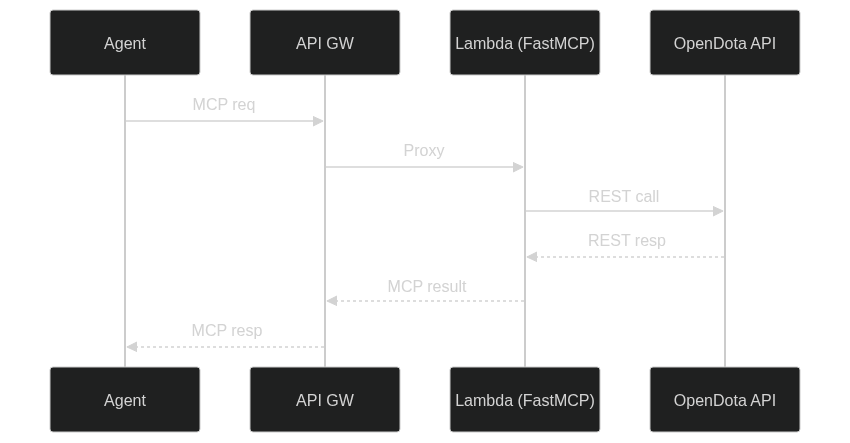
The architecture is very straightforward:
- A Lambda function hosts the FastMCP server that exposes the OpenDota API as MCP tools.
- API Gateway provides an HTTP endpoint that routes requests to the Lambda function.
- AI agents can send HTTP requests to the API Gateway endpoint to invoke MCP tools.
This project uses:
- FastMCP: Python framework that auto-generates MCP tools from OpenAPI specifications
- Mangum: ASGI adapter for running FastMCP on AWS Lambda
- AWS CDK: Infrastructure as code for deploying API Gateway + Lambda
- UV: Modern Python package manager for dependency bundling
- AWS Lambda Powertools: Lambda utilities (though Mangum was preferred for ASGI compatibility)
Project Structure
├── lib/ # CDK stack definitions
├── python-lambda/ # Python MCP server code
│ ├── lambda_function.py # AWS Lambda handler with Mangum adapter
│ ├── pyproject.toml # Python de    pendencies
│ └── uv.lock # Locked dependencies for reproducible builds
├── cdk.json # CDK configuration
├── package.json # Node.js dependencies
└── README.md # Quick start & deployment instructions
Is this a good idea?
I want to focus on the discussion around whether this automatic conversion from OpenAPI to MCP tools is a good idea in practice. Feel free to skip my meandering thoughts and jump to the implementation details if you just want to see how it was built.
There’s a good write-up by Jeremiah Lowin, the creator of FastMCP, on why this approach can be problematic in practice. The gist of it is that while automatic conversion is convenient, it often leads to bloated and inefficient agent interfaces that are hard to use effectively. Definitely recommend reading his post for a deeper dive into this topic - I’ll just summarize a few key points here:
Purpose: REST APIs often have dozens or hundreds of endpoints. These are designed to be consumed by applications with specific use cases in mind. In contrast, MCP tools are intended to be more general-purpose and composable, allowing for greater flexibility in how they are used. Probably the main issue here is that OpenAPI specs are written for humans and lack the semantic clarity, i.e. natural language context, that explains why a tool should be used and not just how to use it.
Context: Each MCP tool that’s available to an AI agent adds to the context window that the agent needs to consider when making decisions, i.e. the mechanism through which an agent can discover and invoke tools is by their descriptions being included in the prompt context. The main concern here is that each MCP server and its tools is eating up precious context. Additionally, ff you have too many tools, the agent may struggle to identify the most relevant ones for a given task - think of overlapping descriptions, i.e. some tools may have very similar names or functionalities, making it hard for the agent to choose the right one. This can lead to confusion and suboptimal tool usage.
Cycle Length: REST APIs response times are usually in the order of tens to hundreds of milliseconds. It’s common to fire off multiple API calls in quick succession to gather data. However, each MCP tool invocation involves additional overhead because even finding which tool to call requires an inference step based on the tool metadata. Then once the tool is selected, the agent has to generate a new prompt that includes the tool call, send it to the MCP server, wait for the response, and then process the result - which is another inference step. This adds significant latency compared to direct API calls. In practice, each MCP tool invocation can be orders of magnitude slower than a direct API call. If an agent has to make many tool calls to accomplish a task, the overall latency can become prohibitive.
So is it a good idea to auto-convert REST APIs to MCP tools and call it a day? No. Is it a good way to quickly prototype an MCP server and experiment with agent interactions? Absolutely. Just be aware of the limitations and be prepared to refine the tool set for production use. Most OpenAPI to MCP parsers allow you to customize which endpoints get included as tools, so you can easily curate a more focused tool set right off the bat - although this is not a substitute for thoughtful tool design.
Implementation
Overall the implementation is fairly straightforward thanks to FastMCP’s OpenAPI integration and Mangum for ASGI compatibility with AWS Lambda.
Take a look at the full source code for this project on GitHub.
Authentication Removal
One challenge was that the OpenDota API supports both public and authenticated endpoints. The public API is accessible without authentication, but the OpenAPI spec includes authentication schemas. I implemented a NoAuthClient that:
- Strips authentication from OpenDota API calls
- Removes security schemes from the OpenAPI specification
Without these changes, the FastMCP solution was not working properly since it expected authentication to be provided and was actually sending invalid headers.
Encoding
Another issue I ran into was with encoding, particularly between MCP-server responses like list_tools and the tools themselves. FastMCP expects UTF-8 strings, but some OpenDota API responses include non-UTF-8 bytes (e.g., in player names). To handle this, I ensured that all responses are properly encoded and decoded as UTF-8, replacing invalid characters as needed.
Mangum
To deploy the FastMCP server to AWS Lambda, I used Mangum, an adapter that allows ASGI applications to run on AWS Lambda. This involved wrapping the FastMCP app with Mangum’s handler, enabling it to process Lambda events and return appropriate HTTP responses. There’s a somewhat equivalent REST API from AWS Lambda Powertools, but it was easier to use Mangum since FastMCP is ASGI-based.
AWS CDK
The AWS CDK Python Lambda has come a very long way since I last used it. Today, you can use UV to manage your Python dependencies and package them seamlessly for Lambda deployment. All you need is a uv.lock file in your Lambda source directory, and CDK takes care of the rest.
There are instructions in the repo on how to deploy the CDK stack to your AWS account for testing and how to configure a tool so that it can call the deployed MCP server via HTTP.
Lessons Learned
As mentioned earlier, auto-converting an entire REST API into MCP tools is not ideal for production use. In general a more AI-centric approach is recommended:
- Start with Agent Stories: Identify the key workflows and tasks that agents need to perform. Write down “As an agent, given {context}, I use {tools} to achieve {outcome}.” This helps focus on the actual use cases rather than exposing every possible endpoint.
- Curate Tools: Instead of exposing every endpoint, select and design tools that align with the identified agent stories. This may involve combining multiple API calls into a single tool or simplifying complex endpoints.
- Optimize for Context: Minimize the number of tools and their complexity to reduce context pollution. Focus on high-value tools that provide the most relevant data for the agent’s tasks.
- Don’t reinvent the wheel: There’s a lot of new AWS services that can help you build robust MCP servers without starting from scratch. For example AWS AgentCore provides a managed MCP server environment that you can leverage.
Conclusion
This project demonstrates both the power and the pitfalls of auto-generating MCP servers. FastMCP makes it trivially easy to expose any OpenAPI-compliant API, but that convenience can lead to bloated, inefficient agent interfaces.
Even so, we were able to successfully build and deploy a serverless MCP server for the OpenDota API using AWS Lambda and API Gateway in a couple of hours. This is exceptional for prototyping and experimentation before you invest in a more curated production solution.
I used Kiro CLI to interact with the MCP server once deployed. Here’s an example of querying player statistics using the FastMCP OpenDota MCP server:
CLI Output
I’m under no illusions that this is even close to Dota Plus, a paid in-game service that provides real-time hero recommendations based on advanced analytics. But it’s pretty cool to see an AI agent using an MCP server to analyze matchups and suggest hero pick - feel free to use it to let your teammates know who’s carrying the game 😁
Acknowledgments
- OpenDota: Free Dota 2 statistics API
- FastMCP: Powerful MCP server framework
- rmcp-openapi: Rust OpenAPI to MCP server generator
- AWS Lambda Powertools: Robust Lambda utilities
- UV: Next-generation Python package management
- Jeremiah Lowin: For the important reality check on MCP auto-conversion